Many important aspects make up your vehicle—working together to keep it running. One of those important aspects is your car’s battery. The battery supplies the necessary current to the starter motor and ignition system, getting the engine going. Because of this, it’s integral to pay close attention to the condition of the battery in your car. Our Avondale area Volkswagen service center has some tips on how to keep your battery in top condition, and what to do if it fails.
Open up your vehicle’s hood and take a look at the battery; make sure that each connection is clean, tight, and corrosion-free. The battery cables act as veins that attach the battery to give it what it needs to operate. Clean corrosion, dust, and rust from around the cables. Regularly test the electrolytes in each cell with a hydrometer; if you get a reading that differs from the others by .05 or more, it may be time for a replacement. Finally, a loose cap or plug can wreak havoc; make sure all of the caps and plugs on the battery are tightly secure and fastened so that battery acid and other fluids don’t leak.
Follow the steps below to test your battery.
Make sure the ignition key and all of your vehicle’s lights are off
Connect the red (or positive) voltmeter test lead to your battery’s positive terminal
Connect the black (or negative) voltmeter test lead to your battery’s negative terminal
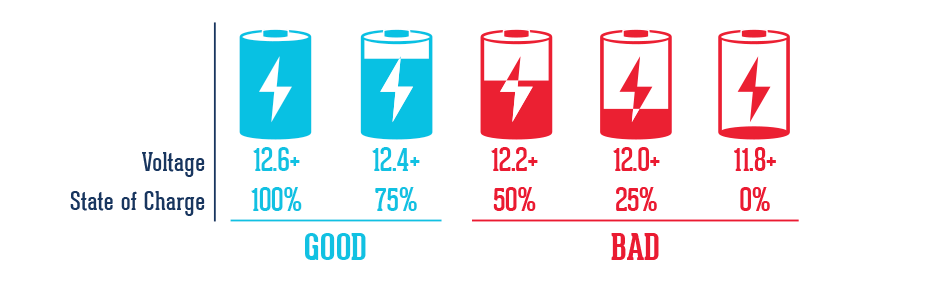
Compare your reading to the following chart
Keep Your Volkswagen On the Avondale Area Roads By Taking Proper Care of the Battery
Unfortunately, car batteries don’t always give a warning before they fail, so it’s important to get them inspected regularly, and replace them about every three years; take a look at your owner’s manual for a more precise interval for your specific Volkswagen model. If you find yourself in a situation with a car that won’t start, follow these steps:
Grab the jumper cables from your trunk
Find another driver who is willing to help you out with the jump
Make sure that both cars are in “park” or “neutral” with the ignitions turned off and emergency brakes on
Remove the caps from each vehicle’s battery and connect the cables
Attach one red clip to the positive terminal on your vehicle’s battery, and attach the other to the positive terminal on the other vehicle’s battery
Attach one black clip to the negative terminal on the other car’s battery, and attach the other black clip to an unpainted, metal surface on your vehicle—away from the carburetor and the battery itself
Try starting your vehicle
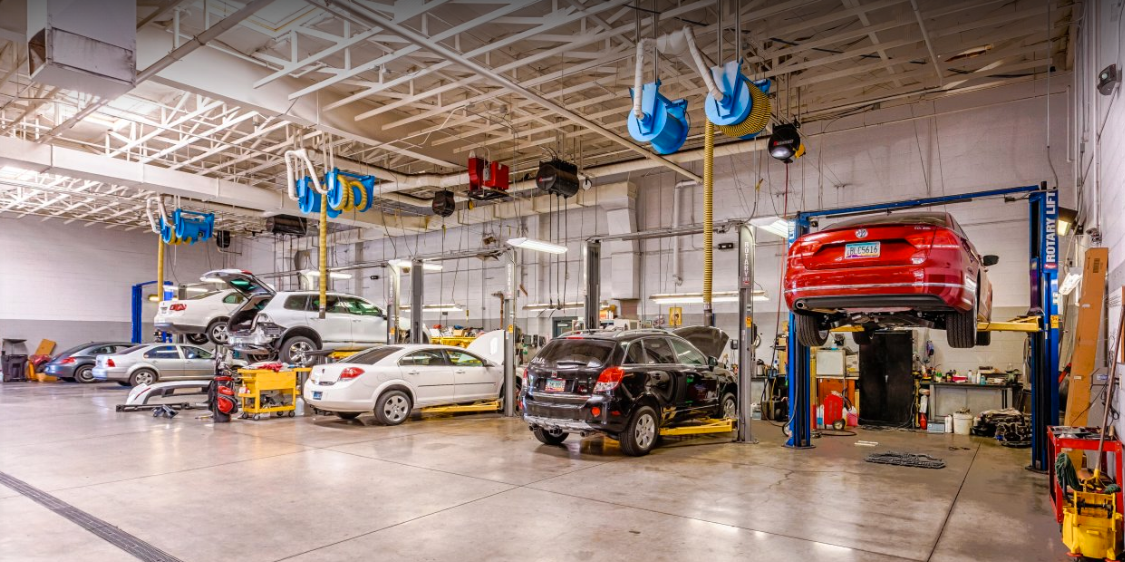
If your vehicle still fails to start, it’s time to get a new battery. If your Volkswagen is in need of a battery inspection or replacement, look no further than Lunde’s Peoria Volkswagen. Our service facility features highly-trained technicians that can take a look at your current battery, and even help you find the right replacement should your vehicle need one. Our skilled service technicians also have the tools and knowledge required to take care of the new battery installation for you. We even offer service specials, so you can take advantage of great savings on Volkswagen service at our Avondale area dealership.
For more information about taking proper care of your vehicle’s battery or to schedule a service appointment at Lunde’s Peoria Volkswagen, contact us at (602) 714-3968.
Does the 2021 Volkswagen Tiguan Have Remote Start?
Yes, the 2021 Volkswagen Tiguan has two trim levels that have remote start. The 2021 VW Tiguan SEL and 2021 VW Tiguan SEL Premium R-Line both have remote start capabilities. Our Peoria and Phoenix area shoppers who are looking for a new SUV, and want to be able to remotely start their vehicle should consider the 2021 VW Tiguan SEL and SEL Premium R-Line. By having remote start, you can make sure you will be nice and cool before entering your Tiguan so you will be ready right away to go on your next adventure. New VW Tiguan Inventory 2021 VW Tiguan Trims with Remote Start 2021 Volkswagen Tiguan SEL 2021 Volkswagen Tiguan SEL Premium R-Line The two highest trim levels of the 2021 VW Tiguan have remote start. The remote start capability is powered through the Volkswagen Car-Net® system. Our Peoria and Phoenix area shoppers who choose the 2021 VW Tiguan SEL and SEL Premium R-Line will get five years access to Car-Net® remote access. Car-Net® allows VW drivers to use remote start, lock and unlock the doors, honk the horn, flash the lights, and more. The Volkswagen Car-Net® system helps keep your Tiguan safe with Anti-Theft Alerts, Automatic Crash Notifications, Emergency Assistance, Roadside Call Assist1, Information Assistance1, and a Stolen Vehicle Locator. On your next long road trip your passengers will be occupied with the VW Car-Net Wi-Fi Hotspot. The 2021 VW Tiguan is not only convenient, it helps keep you safe. Shop for the New Volkswagen Tiguan Near Phoenix To get behind the wheel of a 2021 VW Tiguan with remote start, please contact us online or visit us at our new Volkswagen dealer, Lunde’s Peoria VW, near Phoenix. If you would like to learn more about any of our other VW models, be sure to browse our site. Here at Lunde’s Peoria VW we pride ourselves on helping our customers find the perfect new vehicle for them. New VW Tiguan Inventory
Which 2021 VW Jetta Trims Have Apple CarPlay and Android Auto?
Every 2021 Volkswagen Jetta trim has Apple CarPlay® and Android Auto™ capabilities with the App-Connect integration. Our Peoria and Phoenix area shoppers can choose from the S, SE, R-Line, SEL, and SEL Premium and still have a 2021 VW Jetta with Apple CarPlay® and Android Auto™. To start App-Connect, you just need to connect your phone with a wire or wirelessly, and you’ll see apps pop up on the touchscreen for you to interact with. New Volkswagen Jetta Inventory 2021 VW Jetta Trims with Apple CarPlay® and Android Auto™ 2021 VW Jetta S 2021 VW Jetta SE 2021 VW Jetta R-Line 2021 VW Jetta SEL 2021 VW Jetta SEL Premium With all five trims of the 2021 Volkswagen Jetta having Apple CarPlay® and Android Auto™ capabilities, you can always stay connected. If you need to know how to get somewhere, don’t worry, just open your Apple Maps or Google Maps and the map will appear on your touchscreen. You can go to your favorite spots, find new places, and get turn-by-turn directions all by opening your GPS app. You’ll never worry about missing a text or call with the Apple CarPlay® and Android Auto™ integration, your screen will alert you when someone is trying to reach you. Our Peoria and Phoenix area music lovers will have a venue on wheels with the 2021 VW Jetta. Just open your favorite music and podcast apps and you can listen to whatever you want through the available BeatsAudio® premium sound system. Shop for the New Volkswagen Jetta in Peoria To get behind the wheel of a 2021 VW Jetta with Apple CarPlay® and Android Auto™ integration, simply contact us online or visit us at our new Volkswagen dealer, Lunde’s Peoria VW. If you would like to learn more about any of our other VW models, be sure to browse our site. New Volkswagen Jetta Inventory
All new Volkswagen models are equipped with Bluetooth technology, allowing you to wirelessly connect your phone to your car. Whether you drive the Jetta or the Beetle, you’ll be able to answer or make phone calls as well as stream music from your phone through your VW vehicle’s sound system. View New Inventory How Do I Use Bluetooth to Stream Audio in my VW? If you’re unsure how to stream audio via Bluetooth in your car, our Volkswagen dealership near Glendale is here to give you some assistance. First of all, you need to make sure that your phone is compatible with your vehicle. Once you pair your phone to your car, you’ll be able to follow the below steps: To start, enable Bluetooth streaming. Press the “Phone” hard key on your infotainment system. Next, select “Set Up” on the touchscreen and press “Bluetooth” Once you’ve selected “Bluetooth,” make sure the setting is checked. (If it’s not, select “Bluetooth audio” to switch it on.) At this point, music can be streamed through your vehicle. To do so, press the “Media” hard key on the infotainment system. Tap the “source” option on the touchscreen and select “BT audio.” Now, you’ll be able to select which device you want to play music through. Playing music from your device is as easy as pressing the “Selection” key on the touchscreen and choosing “My Music,” which will then reveal all of your artists, albums, songs, and playlists. Learn More About Your VW Model’s Tech From Our Glendale Area Dealership Besides Bluetooth, Volkswagen has plenty of innovative technology features available across its new vehicle lineup that we encourage our shoppers to learn more about. When you get behind the wheel, you can take advantage of the Volkswagen Digital Cockpit, VW Car-Net® Security & Service, and more!
Feel free to contact our VW dealership near Glendale for more information on your vehicle’s Bluetooth and other tech features! View New Inventory
Contact Us
Fill out this form below and we'll contact you shortly


 If your vehicle still fails to start, it’s time to get a new battery. If your Volkswagen is in need of a battery inspection or replacement, look no further than Lunde’s Peoria Volkswagen. Our service facility features highly-trained technicians that can take a look at your current battery, and even help you find the right replacement should your vehicle need one. Our skilled service technicians also have the tools and knowledge required to take care of the new battery installation for you. We even offer service specials, so you can take advantage of great savings on Volkswagen service at our Avondale area dealership.
For more information about taking proper care of your vehicle’s battery or to schedule a service appointment at Lunde’s Peoria Volkswagen, contact us at (602) 714-3968.
If your vehicle still fails to start, it’s time to get a new battery. If your Volkswagen is in need of a battery inspection or replacement, look no further than Lunde’s Peoria Volkswagen. Our service facility features highly-trained technicians that can take a look at your current battery, and even help you find the right replacement should your vehicle need one. Our skilled service technicians also have the tools and knowledge required to take care of the new battery installation for you. We even offer service specials, so you can take advantage of great savings on Volkswagen service at our Avondale area dealership.
For more information about taking proper care of your vehicle’s battery or to schedule a service appointment at Lunde’s Peoria Volkswagen, contact us at (602) 714-3968.