Blog / Peoria Volkswagen

How to Bake a Volkswagen Cake

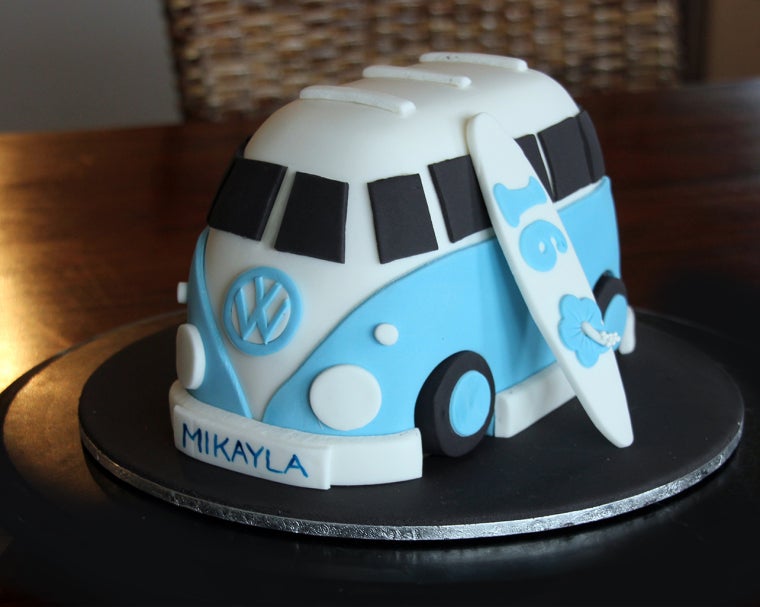
VW bus cake
Volkswagen fans are a special bunch. Their dedication and loyalty to the brand is like no other. If you’ve got a special occasion coming up, why not incorporate your favorite vehicle brand into it? After all, what’s a celebration without cake? At Lunde’s Peoria Volkswagen, we’ve got the how-to on creating a cake version of the iconic Volkswagen Bus--the perfect cake for any VW lover!Just one of these cakes serves about 16. Below are the materials you’ll need before you begin!
  • A 9-inch round cake board
  • A thin card with a glossy side
  • White sugar paste
  • Black sugar paste

Here’s What You’ll Do:

  • Cut out your set-up board from the thin card sheet.
  • Shape it into a van, approximately six-inches by three-inches; keep in mind that your board should be a little larger than the cake.
  • Use a non-slip mat under your set-up board.

Baking the Cake

To create the cake itself, you’ll need the following ingredients:
  • 220 g unsalted butter
  • 180 g dark chocolate
  • 4.5 g instant coffee
  • 1 cup warm water
  • 170 g caster sugar
  • 230 g self-rising flour
  • 25 g cocoa
  • 2 small eggs
  • 1 teaspoon vanilla
Using a six-inch square cake pan, grease and line the base and sides of the cake pan with one thickness of baking paper--bringing the paper 5-centimeters above the side of the pan. Combine the butter, chocolate, coffee, and water in a saucepan. Stir over low heat until the chocolate is melted, and allow to cool for 15-minutes. Once cooled, transfer the mixture to the bowl of a mixer. Add the caster sugar to the mixture and beat well until dissolved. Sift the flour and cocoa and add to the mixture. Add in the eggs and vanilla and mix until combined. Transfer the mixture to the baking pan and bake for one hour at 300-degrees F.

Make the Ganache

Click on the link here for detailed instructions on creating the ganache for this cake.Once you’ve made the ganache and the cake has cooled, cut the cake in half and stick one-half of your set-up board with ganache. Level the top. Spread with an even layer of ganache and add the remaining piece of the cake on top and shape the roof. Using some of the cut-offs, fill in the rounded front of the van and use a sharp knife to create a van shape. Cover with a thin layer of ganache and coat with cake crumbs. Place the cake in the fridge for about a half-hour then add more ganache to create the final, smooth shape.baking a cakePlace the cake back in the fridge to harden--leaving it overnight. The following day, cover the cake with white sugar paste and place it back in the fridge to harden. Next, cut out a template for the blue lower section of the van, cut out the wheel arches, and wheels, and use the black sugar paste for the windows. Use the white sugar paste for the roof rack and make the VW badge out of a large circle of blue sugar paste. Attach the wheels with royal icing and voila!This cake is sure to be a show-stopper at your next celebration, and is sure to please the Volkswagen enthusiast in your life! For more information, contact Lunde’s Peoria Volkswagen at (602) 714-3968.      
Posted in:

Related Posts

The 2021 VW Tiguan driving down a dirt road.

Does the 2021 Volkswagen Tiguan Have Remote Start?

Yes, the 2021 Volkswagen Tiguan has two trim levels that have remote start. The 2021 VW Tiguan SEL and 2021 VW Tiguan SEL Premium R-Line both have remote start capabilities. Our Peoria and Phoenix area shoppers who are looking for a new SUV, and want to be able to remotely start their vehicle should consider the 2021 VW Tiguan SEL and SEL Premium R-Line. By having remote start, you can make sure you will be nice and cool before entering your Tiguan so you will be ready right away to go on your next adventure. New VW Tiguan Inventory 2021 VW Tiguan Trims with Remote Start 2021 Volkswagen Tiguan SEL 2021 Volkswagen Tiguan SEL Premium R-Line The two highest trim levels of the 2021 VW Tiguan have remote start. The remote start capability is powered through the Volkswagen Car-Net® system. Our Peoria and Phoenix area shoppers who choose the 2021 VW Tiguan SEL and SEL Premium R-Line will get five years access to Car-Net® remote access. Car-Net® allows VW drivers to use remote start, lock and unlock the doors, honk the horn, flash the lights, and more. The Volkswagen Car-Net® system helps keep your Tiguan safe with Anti-Theft Alerts, Automatic Crash Notifications, Emergency Assistance, Roadside Call Assist1, Information Assistance1, and a Stolen Vehicle Locator. On your next long road trip your passengers will be occupied with the VW Car-Net Wi-Fi Hotspot. The 2021 VW Tiguan is not only convenient, it helps keep you safe. Shop for the New Volkswagen Tiguan Near Phoenix To get behind the wheel of a 2021 VW Tiguan with remote start, please contact us online or visit us at our new Volkswagen dealer, Lunde’s Peoria VW, near Phoenix. If you would like to learn more about any of our other VW models, be sure to browse our site. Here at Lunde’s Peoria VW we pride ourselves on helping our customers find the perfect new vehicle for them. New VW Tiguan Inventory

Which 2021 VW Jetta Trims Have Apple CarPlay and Android Auto?

Every 2021 Volkswagen Jetta trim has Apple CarPlay® and Android Auto™ capabilities with the App-Connect integration. Our Peoria and Phoenix area shoppers can choose from the S, SE, R-Line, SEL, and SEL Premium and still have a 2021 VW Jetta with Apple CarPlay® and Android Auto™. To start App-Connect, you just need to connect your phone with a wire or wirelessly, and you’ll see apps pop up on the touchscreen for you to interact with. New Volkswagen Jetta Inventory 2021 VW Jetta Trims with Apple CarPlay® and Android Auto™ 2021 VW Jetta S 2021 VW Jetta SE 2021 VW Jetta R-Line 2021 VW Jetta SEL 2021 VW Jetta SEL Premium With all five trims of the 2021 Volkswagen Jetta having Apple CarPlay® and Android Auto™ capabilities, you can always stay connected. If you need to know how to get somewhere, don’t worry, just open your Apple Maps or Google Maps and the map will appear on your touchscreen. You can go to your favorite spots, find new places, and get turn-by-turn directions all by opening your GPS app. You’ll never worry about missing a text or call with the Apple CarPlay® and Android Auto™ integration, your screen will alert you when someone is trying to reach you. Our Peoria and Phoenix area music lovers will have a venue on wheels with the 2021 VW Jetta. Just open your favorite music and podcast apps and you can listen to whatever you want through the available BeatsAudio® premium sound system. Shop for the New Volkswagen Jetta in Peoria To get behind the wheel of a 2021 VW Jetta with Apple CarPlay® and Android Auto™ integration, simply contact us online or visit us at our new Volkswagen dealer, Lunde’s Peoria VW. If you would like to learn more about any of our other VW models, be sure to browse our site. New Volkswagen Jetta Inventory

VW Tiguan for sale near Glendale

Does My Volkswagen Have Bluetooth?

All new Volkswagen models are equipped with Bluetooth technology, allowing you to wirelessly connect your phone to your car. Whether you drive the Jetta or the Beetle, you’ll be able to answer or make phone calls as well as stream music from your phone through your VW vehicle’s sound system. View New Inventory How Do I Use Bluetooth to Stream Audio in my VW? If you’re unsure how to stream audio via Bluetooth in your car, our Volkswagen dealership near Glendale is here to give you some assistance. First of all, you need to make sure that your phone is compatible with your vehicle. Once you pair your phone to your car, you’ll be able to follow the below steps: To start, enable Bluetooth streaming. Press the “Phone” hard key on your infotainment system. Next, select “Set Up” on the touchscreen and press “Bluetooth” Once you’ve selected “Bluetooth,” make sure the setting is checked. (If it’s not, select “Bluetooth audio” to switch it on.) At this point, music can be streamed through your vehicle. To do so, press the “Media” hard key on the infotainment system. Tap the “source” option on the touchscreen and select “BT audio.” Now, you’ll be able to select which device you want to play music through. Playing music from your device is as easy as pressing the “Selection” key on the touchscreen and choosing “My Music,” which will then reveal all of your artists, albums, songs, and playlists. Learn More About Your VW Model’s Tech From Our Glendale Area Dealership Besides Bluetooth, Volkswagen has plenty of innovative technology features available across its new vehicle lineup that we encourage our shoppers to learn more about. When you get behind the wheel, you can take advantage of the Volkswagen Digital Cockpit, VW Car-Net® Security & Service, and more! Feel free to contact our VW dealership near Glendale for more information on your vehicle’s Bluetooth and other tech features! View New Inventory